- Email: help.sathisung@gmail.com
- Call: (+91) - 97124 97174


Sathisung.com is one of the best and trusted matrimonial website in India. Sathisung is founded with main motive - to complete unfinished hearts. We provide you best platform for choosing right partner, especially for Indian cultural setup and ensuring to member by 100% screening, exclusive privacy options, photo protection features and verification of phone numbers and more information. Sathisung also offers you offline match point, for deeper and personal interaction with prospective brides, grooms or families.

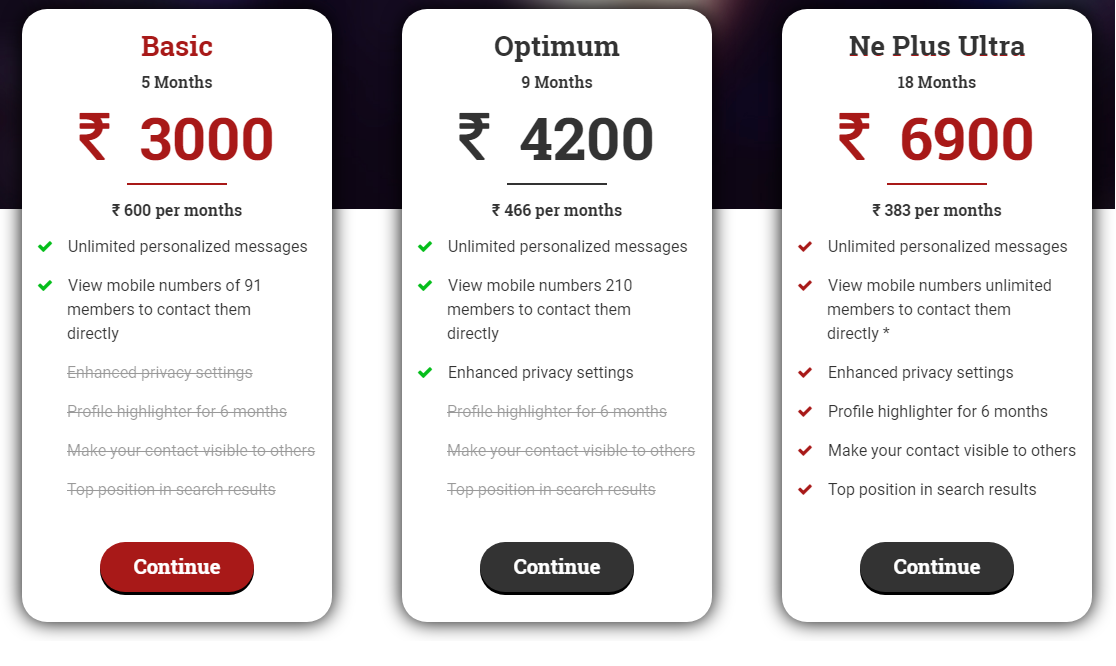
| Benefits You Get | Free | Basic | Optimum | Ne Plus Ultra |
|---|---|---|---|---|
| Send and Receive interest from other members | ||||
| Browse unlimited profiles of members that you like | ||||
| Unlimited personalized messages | ||||
| View contact number of members you like | ||||
| Priority over free member | ||||
| Enhanced privacy settings | ||||
| Top position in search results | ||||
| Profile highlighter, For a particular months, which make you profile standout | ||||
| Priority customer service | ||||
| Make your contact visible to other |